


Your keyboard is your main connection to every game you play. If you still use a basic keyboard, you’re missing out on the speed and accuracy features. Standard keys can feel spongy and slow. They can delay your actions when every millisecond counts. Upgrading to a mechanical keyboard changes your entire experience. Mechanical switches give you clear physical feedback with every key press. You get faster response times, better durability, and keys that never miss a hit.
You also get complete control over how your setup looks and feels. Finding the best mechanical gaming keyboard can feel overwhelming with so many choices available. You have to navigate different switch types, sizes, keycap materials, and wireless options. This guide breaks down everything you need to know in plain language. By the end, you will know exactly what to look for to pick the best mechanical gaming keyboard for your budget and your play style.
1. Understanding Mechanical Switches
The switches under the keycaps are the most important part of your keyboard. They dictate how every press feels and sounds. Choosing the right switch type is the biggest step toward landing the best mechanical gaming keyboard for your setup. Linear switches offer a smooth and consistent press from top to bottom. They have no tactile bump or loud click. This design makes them extremely fast for rapid key presses, which is why FPS gamers love them.
Tactile switches give you a small bump in the middle of the key travel. You can feel the exact moment the key registers without hearing a loud noise. They work great if you split your time between gaming and typing. Clicky switches produce a noticeable bump along with a sharp click sound. They give great feedback, but the noise can annoy teammates on voice chat.
Newer keyboards use magnetic or optical switches. Magnetic switches allow you to change how deep you must press a key to register an action. They also feature rapid trigger tech, which resets the key instantly when you lift your finger. This gives you a massive speed advantage in fast-paced competitive games. Look at the actuation force and travel distance before you buy. Actuation force is how hard you need to press the key. Travel distance is how far the key moves down. Lighter force and shorter travel mean faster inputs, which helps you react quicker in game.
2. Choosing the Right Form & Layout
The size of your keyboard impacts how much room you have to sweep your mouse. Finding the right layout plays a huge role in building the best mechanical gaming keyboard setup for your desk. Full-size keyboards feature all 104 keys, including a dedicated number pad on the right. They are fantastic if you use your computer for work or entry-heavy tasks during the day. However, they take up significant desk space and push your mouse hand far to the side.
Tenkeyless boards, often called TKL or 80 percent, remove the number pad entirely. You retain your arrow keys, navigation keys, and top function row. This design gives your mouse hand extra space while keeping most essential shortcuts intact. Compact 75 percent and 65 percent layouts squeeze keys closer together. They drop the extra space between sections but keep critical arrow keys. You get maximum room for low-DPI mouse flicks in fast games without sacrificing daily typing comfort.
Ultra-compact 60 percent keyboards strip away everything except the main typing zone. You lose dedicated function keys, arrow keys, and navigation buttons. These boards appeal to minimalist gamers and competitive esports players who need ultimate desk real estate. Choose a layout based on how you plan to use your desk. If you play competitive first-person shooters, smaller layouts free up vital arm space. If you play simulation games or work on spreadsheets, a larger board might serve you better.
3. Build Quality, Keycaps & Aesthetics
The materials used to build a keyboard decide how long it lasts and how it feels under your fingers. High build quality makes a huge difference when you want the best mechanical gaming keyboard for long sessions. Keyboard cases come in plastic or metal. Plastic frames are light and budget-friendly, but they can bend under pressure. Aluminum frames cost more, but they feel rock solid and stay firmly planted on your desk during intense matches.
Keycap material matters just as much as the case. Cheap keycaps made of ABS plastic wear down fast and start to look shiny and greasy over time. Better keycaps made of double-shot PBT plastic feature a textured surface that resists wear, grease, and fading. How the keyboard is assembled inside also affects how it sounds. Many premium boards use gasket mounts and internal foam to cushion your typing. This setup absorbs harsh vibrations and softens key strikes. It gives your keys a deep, smooth sound rather than a hollow, loud clack.
4. Connectivity & Gaming Performance
How your keyboard connects to your computer plays a big role in your gaming performance. Picking the right connection type is key to getting the best mechanical gaming keyboard experience. Wired keyboards connect using a standard USB cable. They give you zero lag, instant response times, and endless power. You never have to pause a game to charge your battery.
Wireless keyboards give you a clean desk without messy cables. Modern wireless models use a small 2.4 GHz USB dongle that delivers speed just as fast as a wired connection. You can play fast games without worrying about lag or delayed inputs. Bluetooth is another wireless option, but it adds noticeable delay. It works fine for typing or casual games, but you should avoid it for fast competitive gaming.
Battery life is important if you choose a wireless setup. Bright RGB lighting drains the battery much faster. Turning off or dimming the lights helps your keyboard last for weeks instead of days.
5. Key Custom Features
Custom features let you tailor your board to match your exact play style. Choosing a model with flexible options ensures you get the best mechanical gaming keyboard for your personal needs. Hot-swappable circuit boards let you change your switches without using a soldering iron. You can pull out old switches and plug in new ones in minutes. This lets you try different switch types whenever you want without buying a whole new keyboard.
Companion software lets you remap keys, build macros, and customize RGB backlighting. You can assign complex key combinations to a single press for faster actions in your favorite games. Good software also lets you save your settings directly to the board’s onboard memory so your profiles go wherever you take your keyboard.
Ergonomic features keep your hands comfortable through long gaming sessions. Look for keyboards with adjustable feet so you can tilt the board to a natural angle. A good wrist rest reduces strain on your joints and helps you play comfortably for hours.
7. Recommendations
Finding the best mechanical gaming keyboard comes down to how you play and work. Use these quick profiles to match your specific style:
a) The Competitive FPS gamer
- Choose magnetic switches with rapid trigger technology for instant input resets.
- Pick a 60% or 65% compact layout to give your mouse maximum room for fast swipes.
- Look for durable PBT keycaps and an 8,000 Hz polling rate for zero-lag precision.
b) The Everyday Gamer and Typist
- Select tactile switches for a satisfying bump that works great for both gaming and work.
- Go with a 75% or Tenkeyless (TKL) layout to save desk space while keeping your arrow keys.
- Get a hot-swappable board so you can easily change switches whenever you want.
c) The Minimalist and Traveler
- Pick a wireless 65% keyboard with a low-latency 2.4 GHz USB dongle.
- Ensure it has a detachable USB-C cable for easy packing into a backpack.
- Look for long battery life so you can play without constant charging stops.
d) The Budget Gamer
- Look for a pre-built TKL or 75% mechanical board with an aluminum top plate.
- Choose linear switches for fast response times at a lower price point.
- Pick a model with hot-swap support so you can upgrade individual parts over time.
8. Mechanical Gaming Keyboards to Consider
Choosing the best mechanical gaming keyboard gets much easier when you compare top-rated options. Here are five excellent keyboards that cover different play styles, features, and budgets.
1. Asus ROG Strix Scope II 96 Wireless

Overall Best Gaming Keyboard
★★★★⯪ 4.5 Excellent
Pros
- Excellent battery life
- Sturdy build
- RGB Backlight
- Hot-swappable
- Weighs 1kg (2.23lbs)
Cons
- 96 percent layout is cramped
- Annoying armor crate software
The Asus ROG Strix Scope II 96 Wireless is by far one of the best. It works amazingly well for gaming, typing, and everyday tasks. It gives you almost every key you need, including a number pad, without taking up much room on your desk. You can connect it with or without a wire, and the battery lasts up to an unbelievable 1,500 hours if you turn off the lights. Asus managed to add custom keyboard features to a true gaming board better than almost anyone else.
The layout squeezes nearly all the keys of a full-size board into a smaller space. It takes a little time to get used to, but it quickly gives you the best of both worlds. You get a full set of numbers in a size that is actually smaller than many keyboards that drop the number pad entirely. It comes with a detachable wrist rest, but the front edge sits low enough that you might not even need it. The metal top makes it feel solid and well-made, while the plastic base ensures your wireless signal stays strong and fast. It also includes double-shot keycaps that stay clean and textured instead of getting smooth and greasy over time.
Even with its tight spacing, you still get a multi-function button and a scroll wheel in the top corner. You can use this wheel to quickly adjust your volume, music, or lighting modes.
Underneath the keys, it uses pre-lubricated switches that feel exceptionally smooth and quiet right out of the box. Every press feels steady and stable. If you ever want to change how the keys feel, you can easily pull the switches out and plug in new ones without soldering.
Connecting the board is simple since you can switch between a ultra-fast wireless dongle, Bluetooth, or a standard USB cable. Its battery life is easily its best feature, letting you play for months on a single charge if you keep the RGB lighting off.
2. Razer BlackWidow V4 Pro

Best Full-Size Keyboard
★★★★☆ 4.0 Great
Pros
- Beautiful RGB lighting
- Plush wrist rest
- Hot-swappable key switches
- Unblemished typing feel
- Easy to open & tinker
Cons
- Expensive
- Include OLED screen is monochrome
- Maintains a 4000Hz polling rate
If you’ve got plenty of desk space, a full-size gaming keyboard is a great choice. The Razer BlackWidow V4 Pro is one of Razer’s top-tier wired keyboard, and it comes packed with useful controls. It gives you eight extra customizable side buttons, a multi-function dial, and color RGB lights that flow from the board straight into the cushioned wrist rest.
This mechanical keyboard is quite large, especially once you attach the plush, padded wrist rest. The rest snaps on using magnets and connects directly to the power, allowing the colorful lighting to spread evenly across your whole desk.
The build quality feels sturdy thanks to a strong metal top plate. It includes four dedicated music control keys and a textured volume roller in the top corner. On the left side, you get five main extra keys, three side buttons, and a customizable dial knob. You can change what every single key does, and the dial knob lets you quickly scroll, zoom, or switch apps with a twist.
You can buy this model with either loud clicky keys or smooth linear keys. It uses a wired connection, so you never have to worry about charging batteries, and it even gives you an extra USB port to plug in another device. Typing can sound a bit noisy and metallic, but many people love that classic clicky feel.
Whilst the biggest downside is the heavy price, it gives you almost every feature imaginable. Not every gamer needs so many extra buttons, dials, and lights. Cheaper options are available but if you want one of the best, the BlackWidow V4 Pro from Razer is the definite choice.
3. SteelSeries Apex Pro Mini
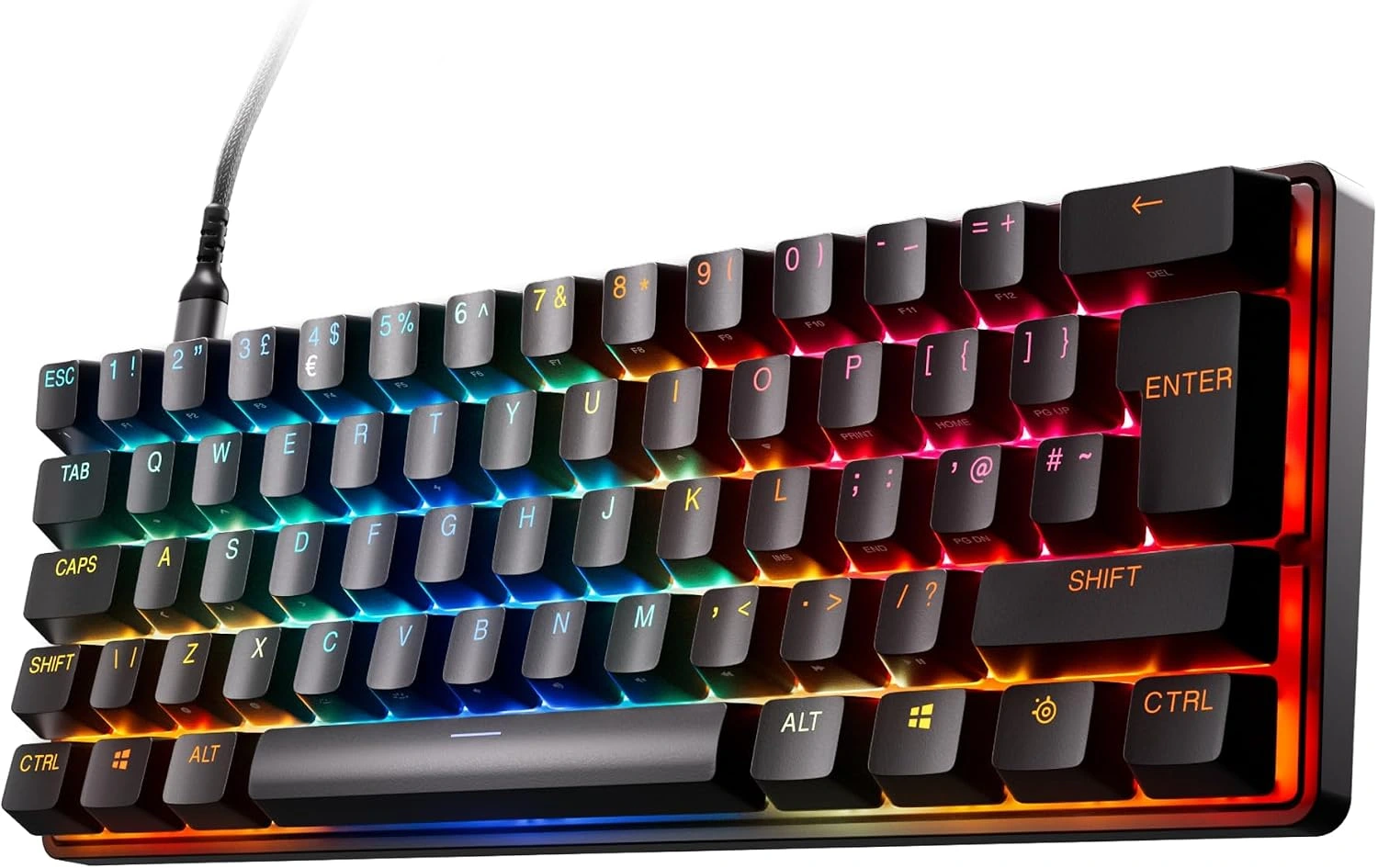
Best Mini Gaming Keyboard
★★★★☆ 4.0 Great
Pros
- Sturdy feel
- Bright & attractive RGB backlit
- Highly customizable
- Available in wired & wireless models
Cons
- Expensive
- SteelSeries software does have issues
- No arrow keys, no number pad, no top ‘functions’ row
Ultra-compact keyboards are not for everyone, but they’re great if you don’t need all the extra buttons of a standard board. These tiny models strip away non-essential keys like the number pad and top function row. Ultra-small designs even remove the arrow keys. Having fewer keys creates a tiny footprint, making it ideal for gamers who tilt their boards, have small desks, or like to travel light. Because you have fewer physical buttons, having strong customization settings is key, which makes the SteelSeries Apex Pro Mini Wireless a top choice for an ultra-compact setup.
This sleek and sturdy keyboard uses special magnetic keys that allow you to adjust how deep you must press each key to register an action. A software update unlocked faster key reset speeds, giving you an extra edge in fast-paced games. The board prints useful secondary shortcuts directly on the sides of the keycaps so you know what every button does. If you do not like the default layout, you can remap almost every key, change individual key lighting, and customize press depths to suit your style.
The build quality feels solid thanks to a strong metal top plate and durable textured keycaps that resist wear. It weighs just over a pound, making it light enough to drop into a bag without feeling cheap on your desk. You can connect through a high-speed wireless USB receiver, Bluetooth, or a standard cable. The battery gives you around 30 hours of game time on a fast wireless connection.
SteelSeries offers a wired version that drops the battery and costs significantly less. They also make a special white and gold edition with a heavy metal frame that feels heavier on your desk. While gaming software can sometimes feel cluttered, setting up this keyboard is simple and lets you save up to five custom layout profiles straight to the board itself.
4. Corsair K70 CORE
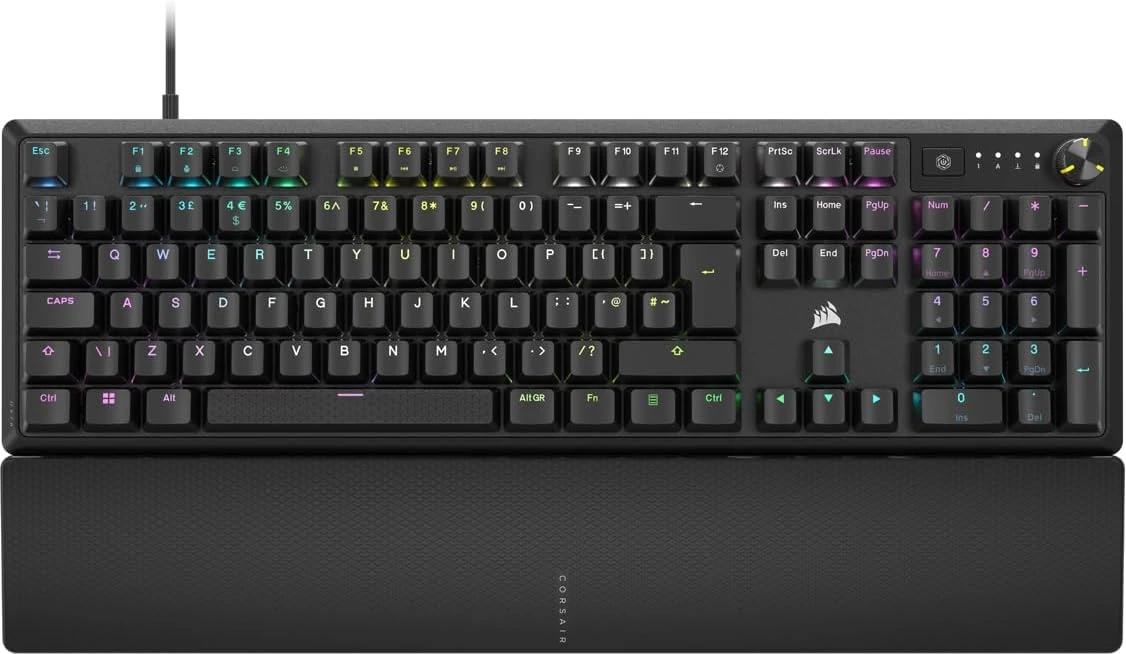
Best Affordable Gaming Keyboard
★★★★⯪ 4.5 Excellent
Pros
- Priced under US$100
- Smooth & silky switches
- Zero case ping
- Proper sound dampening
- Double-shot ABS keys
- Weighs 934g (2.05lbs)
Cons
- Sweaty wrist rest
- Non-detachable USB cable
Finding a great gaming keyboard usually forces you to choose between paying a small fortune or settling for cheap plastic that feels awful to type on. The Corsair K70 CORE changes that rule completely, giving you high-end features and a custom-built feel without spending a fortune.
From the very first press, you’ll notice how smooth and fast the keys feel. Corsair uses its own pre-lubricated MLX Red linear switches, which means there is no scratchy friction or annoying resistance when you’re in the middle of an intense gaming session. Even better, the inside of the board packs two thick layers of sound-dampening foam. Instead of a loud, hollow clack every time you hit a key, you get a deep, muted, and deeply satisfying sound that usually costs twice as much to achieve.
Your desk setup also gets a major upgrade in both comfort and control. The sturdy aluminum top plate keeps the whole keyboard rock-solid so it never bends or flexes when things get hectic. When you’re settling in for a long night of gaming or typing, the magnetic soft-touch palm rest snaps right onto the front to keep your wrists comfortable. Up in the top right corner, a handy multi-function rotary dial lets you adjust your volume, zoom in on a page, or dim your bright per-key RGB lighting on the fly without ever tabbing out of your game. You can even use the iCUE software to remap keys, set up FlashTap for faster movement in shooters, and save up to five custom profiles directly onto the keyboard.
At the end of the day, the Corsair K70 CORE hits that rare sweet spot where price, comfort, and pure performance meet. You get the durability of double-shot keycaps, the quiet satisfaction of a custom-modded board, and the reliable speed you need to win, all in one clean package. If you want a keyboard that makes both gaming and everyday typing feel effortless right out of the box, this is easily one of the smartest buys you can make right now.
5. Logitech G515 Lightspeed TKL
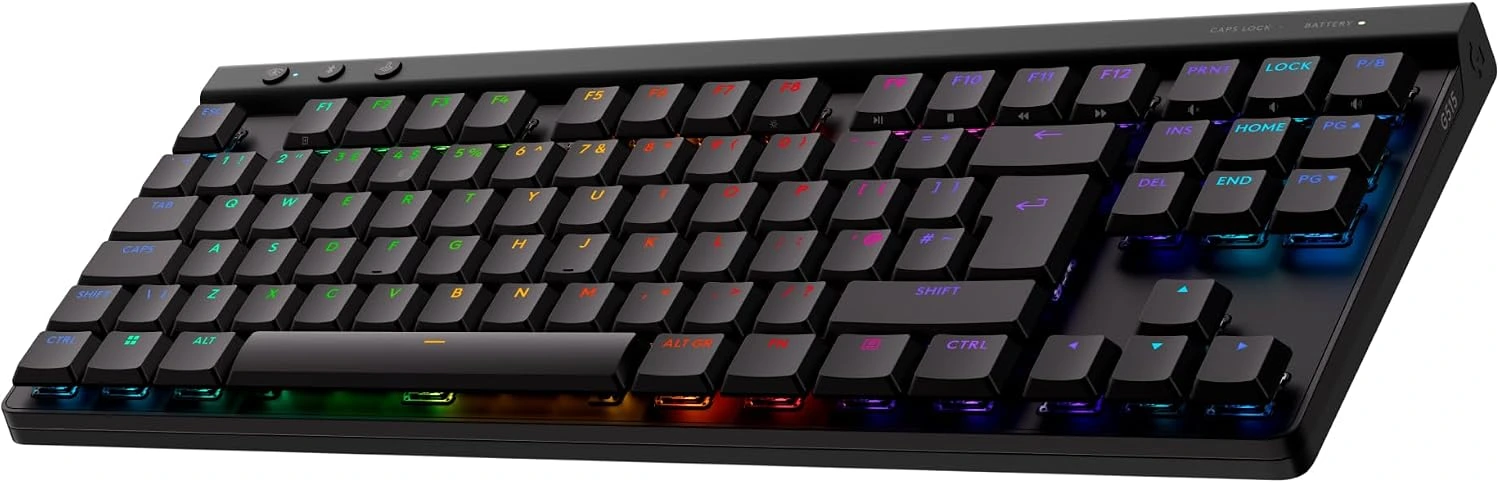
Best Affordable TKL Gaming Keyboard
★★★★☆ 4.0 Great
Pros
- Slim, lightweight & solid build
- Sounds & feels pretty good
- Great battery life
- Weighs 880g (1.94lbs)
Cons
- Keycaps feel a little flat & slippery
- Sounds like plastic & it rattles
- Only connects with one Bluetooth device at a time
Bulky, noisy gaming keyboards can quickly clutter your desk and leave your wrists aching after a long session. The Logitech G515 Lightspeed TKL flips that script by packing true mechanical speed into an ultra-thin, wireless frame that feels as sleek as a modern laptop while still giving you the punchy precision you need to win.
Right away, you will notice how comfortable this keyboard feels under your hands. At just 22 millimeters tall, its low-profile design lets your wrists rest naturally on your desk without even needing a bulky wrist rest. Because it uses a compact 10-keyless layout, it drops the number pad on the right, freeing up tons of extra space for sweeping mouse movements during intense matches. Underneath your fingers, the factory-lubed low-profile GL mechanical switches trigger at a super-fast 1.3 millimeters, meaning your inputs register the instant you tap a key. Layered sound-dampening foam inside the case also keeps every keystroke quiet and smooth rather than loud and hollow.
You also get complete freedom over how you connect and play. With tri-mode connectivity, you can jump between rock-solid 2.4GHz Lightspeed wireless for lag-free gaming, Bluetooth for your laptop or tablet, or a simple wired USB-C connection with the push of a button. Even better, you can pair a compatible Logitech Lightspeed mouse to the exact same USB receiver to save a port on your PC. The textured double-shot PBT keycaps resist shiny finger oils over time, while Logitech G HUB lets you customize your per-key RGB lighting and assign up to 15 different actions to any single key using Keycontrol.
When you put it all together, the Logitech G515 Lightspeed TKL proves you don’t have to sacrifice comfort or desk space to get serious gaming speed. It delivers crisp responsiveness, whisper-quiet typing, and clutter-free wireless performance in a sharp design that looks great anywhere. If you want a slim, versatile mechanical keyboard that handles both late-night gaming and everyday work without breaking a sweat, this is easily one of the best choices on the market today.
8. Last Thoughts
Choosing the right mechanical gaming keyboard in 2026 comes down to how you work and, of course, how you play. Every gaming keyboard on this list brings serious speed and great build quality to your desk. You just need to match the right features to your personal setup.
If you want pure competitive speed, look for magnetic Hall-effect switches with rapid trigger. If you prefer a clean, wireless desk, a slim ten keyless or compact 75% layout is your best bet. You no longer have to spend a fortune to get factory-lubed switches and quiet, cushioned typing. Even mid-range boards now deliver a custom-built feel right out of the box.
Take a look at your desk space and your budget. Think about whether you need a number pad for daily tasks or extra room for wide mouse sweeps. Check out these gaming keyboards on this list, click on the red buttons to find out more and see the latest prices. Once you decide on the one that suits you, your everyday gaming and your everyday typing experience will feel better than ever.
Let’s hear from you. Looking for a mechanical gaming keyboard? Which one of these are you interested in? Let us know in the comments below. We look forward to hearing from you 😎


 LGMadyibi


+ There are no comments
Add yours